

I love tracking things and I love skiing, so obviously I keep track of every day I ski. I do this using a Notion database, which can be a bit confusing to set up if you are new to the app. I created a template and included step-by-step instructions so we can all track our ski (or snowboard) days this winter!
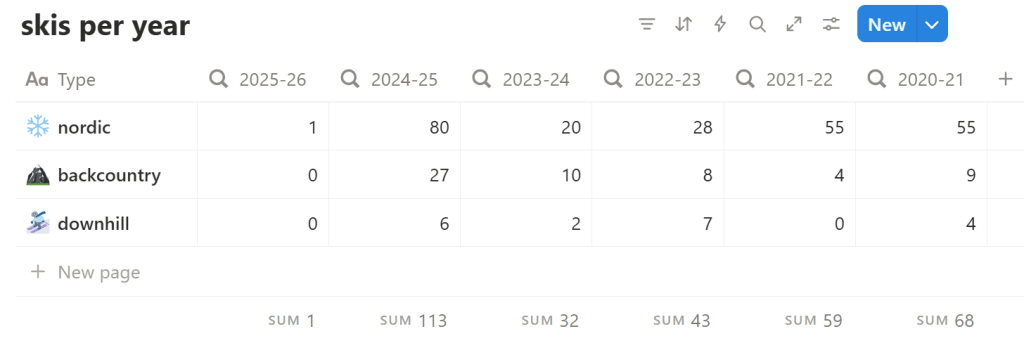
The ski day tracker is fully customizable for all of the winter sports you do. I have 3 types that I track: Nordic (or cross country skiing), backcountry skiing either in the backcountry or uphill at a resort, and downhill skiing, which is any ski day where I ride a chairlift. If you snowboard, telemark ski, or race, you could add those as types too, to accurately track your ski days.
Add the template to your Notion
- Go to the template page
- Click duplicate ⿻
- Log in or sign up for a Notion account
- Once you are logged in, a pop up will appear asking: Where would you like to add Ski Day Tracking?
- Select the workspace > click add
It may take a minute to load. Once it’s duplicated into your workspace, you are ready to start tracking.
How to use
These instructions are also included in the template.
Add a new ski day
- Go to the correct database: I split mine up by season, so this year I’ll add to 2025-26 Season
- click New Page
- add a Ski name (I usually name mine after my Strava titles)
- select the Type – you must add a Type for it to show up in Skis per Year
- add the date
- The page will auto-populate into the Skis per Year database
- This acts as the dashboard to show you your ski days per year over however many seasons you have entered
Add a new ski type
- Go to Skis per Year database
- New page:
- name it (ex. Telemark)
- add emoji – optional
- It will auto-populate under the ski type column on all connected databases
Add a new ski season database
- Click the group of 6 dots on the left of the most recent database, select Duplicate > Duplicate without Content
- Wait for the database to load – this could take a minute!
- Rename the database
- ex. change to 2026-27 Season
- On the Ski Type column: click Edit Property > Turn Two-way relation on
- rename the relation, I do 2026-27ski
- On Skis per Year database
- Settings > Edit Properties > Add New Property > Rollup
- Relation: select the relation you just renamed in step 4 (ex. 2026-27ski)
- Target Property: Ski
- Calculate > Count > Count all
- Rename Rollup property (I do 2026-27)

Customization ideas
There are endless ways to make the template work best for you, but here are a few ideas I have:
- Add a link to your Strava activity
- Include a price column to track your ski spending for the year
- Tag your friends in an activity if they have a Notion
- Add a wax column to track when you last waxed your skis
Find the template here. Happy tracking!
Discover more from Trail Carrot
Subscribe to get the latest posts sent to your email.
